


Ping Pong Fury
4.62.47K Reviews
App Specs
- Version
- 1.66.0.6491
- Updated On
- License
- Free
- Downloads
- 10,000,000+
- Developer
- Yakuto
- Categories
- Sports
- Platform
- Android, iOS
Screenshots




 Analysis by AppCompare
I like mobile sports games best when they make a short break feel lively without asking me to learn a complicated control scheme first. Ping Pong Fury is built around that quick, familiar idea: move a finger to play a table-tennis rally, then adjust your aim and timing as the exchange speeds up. It is an online multiplayer sports game from Yakuto, and its appeal comes less from lengthy sessions than from the immediate pressure of trying to return one more shot.
How quickly a match finds its rhythm
The basic interaction is easy to grasp, but that does not mean every rally feels effortless. A swipe has to do more than send the ball back: direction and timing influence whether a shot is safe, awkward for an opponent, or ambitious enough to risk going long. That makes the learning curve approachable at first and more demanding as I start paying attention to placement instead of simply reacting.
In practical terms, I would treat the opening matches as a chance to learn how my gestures translate on screen. I would avoid making every swipe as hard or wide as possible; a controlled return is often more useful than a flashy attempt that gives away a point. That small change in mindset makes the game feel less like frantic finger tapping and more like a quick contest of anticipation.
What happens when play gets busy
The pace can make a close exchange feel exciting, especially when I have to read the incoming ball and choose a response without much time to deliberate. It also means that this is not always the right game to open while distracted. If I am walking, listening for someone nearby, or trying to answer messages between points, my attention is split in exactly the way a fast rally punishes.
For a realistic everyday use, I can see it fitting a short sit-down break: a few focused matches while waiting for a friend or taking a pause at home. I would not plan on it as background entertainment. The opponent’s next shot arrives too quickly for half-attention to feel satisfying, and online play is more enjoyable when I can concentrate on the exchange rather than rushing through it.
Connection, consistency, and what I can control
Because the central attraction is competing with other people online, the quality of a match depends on more than my own timing. A steady connection and a responsive device matter for a game where a brief delay can change a return. I would use a reliable network when possible and close other demanding tasks if the phone is already struggling; those are sensible steps for reducing avoidable interruptions, not a promise that every match will be perfectly smooth.
There is a useful distinction between a bad result and a bad session. Losing a rally because I aimed poorly is part of learning; a stutter or interrupted connection can make it harder to tell whether I chose the wrong shot. When play feels inconsistent, I would first try another session in a less congested setting before deciding the controls are the problem. That helps keep the game’s skill challenge separate from conditions outside my control.
Worth Reading Before You Choose

Flipboard Shows What News Apps Must Do Beyond the Feed

Switching to Android Auto Means Rethinking Your Driving Routine

Google Calendar Makes a Crowded Week Easier to Manage

Ludo King Makes the Most of the Minutes Between Plans

Baby Panda World Brings Quick Play to Modern Phones, but Its Game Library Feels Busy

ESPN’s Live Game View Makes Following Close Games Easier
Device fit and value before installing
The game is free to download and is rated for Everyone, which makes it easy to try without committing to a purchase. It includes optional in-app purchases ranging from $0.99 to $99.99 per item, so I would be mindful of spending if I prefer to keep mobile games strictly free. The current version is 1.61.0.6478 and it requires Android 8.0 or later; on iOS, I would check the App Store’s compatibility details for my particular device before installing.
It has a 4.6 average from around 204,000 ratings, with over 10 million installs. Those figures suggest a well-established audience, but they do not tell me whether a particular phone or network will give me the experience I want. If I use an older or entry-level device, I would try a match before settling in for a long session and keep expectations practical: the most important test is whether the touch response and online play feel dependable on my own setup.
The Gameplay Experience
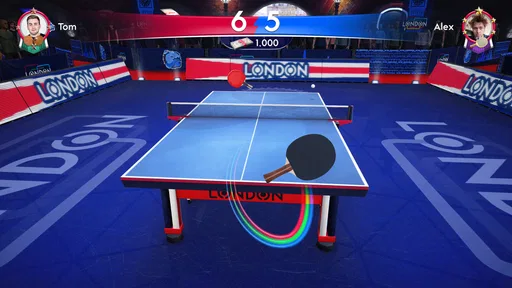
From the get-go, Ping Pong Fury does a stellar job of replicating the fast-paced action of a real table tennis match. The controls are intuitive, allowing you to swipe your finger to serve, spin, and smash your way to victory. I found the touch controls to be responsive and surprisingly natural, which made rallies feel exciting and dynamic.
One of the coolest features is the variety of shots you can perform. Whether it’s a topspin, backspin, or a cheeky drop shot, the game lets you experiment with different techniques. I especially enjoyed the challenge of mastering the timing and direction of each shot, which added a layer of strategy to the gameplay.
Visuals and Sound
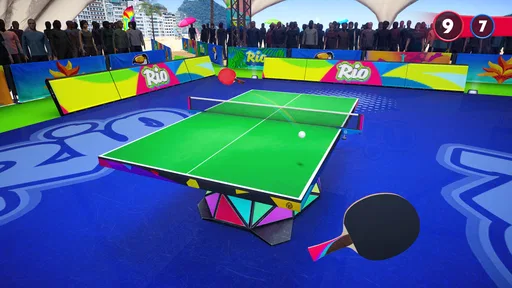
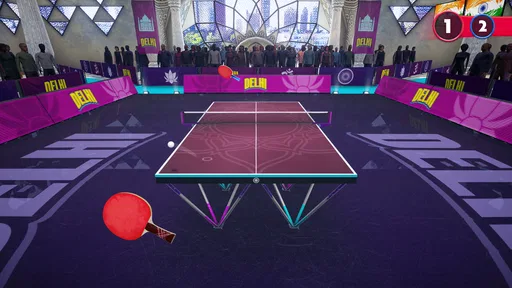
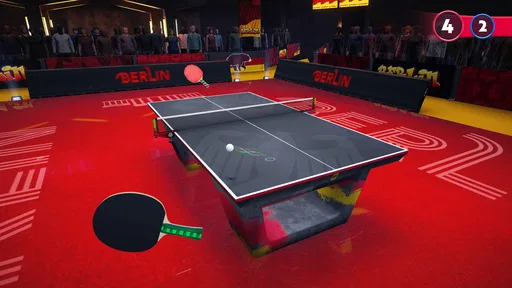
The graphics in Ping Pong Fury are impressive. The developers have done an excellent job of creating vibrant environments that add to the overall immersion. Each match takes place in a unique venue, from sleek modern arenas to quaint backyard setups, and the attention to detail is impeccable.
The sound design also deserves a mention. The satisfying "thwack" of the ball as it hits the paddle and the crowd's reactions during intense rallies bring the game to life. It’s the little things that make you feel like you’re part of a real match.
Multiplayer Mode
What really got me hooked is the multiplayer mode. You can play against your friends or be matched with players from around the world. This adds a competitive edge that keeps you coming back for more. The thrill of climbing the leaderboards and earning rewards for your victories is incredibly satisfying.
There’s also a nifty feature where you can customize your avatar and paddles, giving you a chance to express your unique style. I found myself spending quite a bit of time tweaking my gear to get that perfect look.
Progression and Rewards
The game’s progression system is well-structured, offering various challenges and tournaments to keep you engaged. As you play, you earn coins and other rewards that can be used to unlock new equipment and upgrade your skills. This sense of progression adds depth to the game, making each match feel rewarding.
There are daily challenges and special events that offer additional rewards and keep things fresh. I appreciated the balance between offering enough rewards to motivate without making the game feel like a grind.
Final Thoughts
After spending some quality time with Ping Pong Fury, I can confidently say it’s a must-try for anyone who enjoys sports games. The combination of realistic gameplay, stunning visuals, and engaging multiplayer mode makes it a standout in the mobile sports genre.
Whether you’re a seasoned table tennis pro or just looking for a fun way to pass the time, this game has something for everyone. So grab your virtual paddle and get ready to serve up some fun. You won’t be disappointed!
Making progress without turning every match into a grind
One trade-off I would keep in mind is that advancement and competition are closely connected. Challenges, tournaments, rewards, and equipment give me reasons to return, but a player who only wants a no-pressure rally may find the pursuit of progress distracting. I would pick one goal for a session—practice a steadier return, complete a challenge, or simply enjoy a few matches—instead of trying to optimize every reward at once.
Equipment upgrades can make progression feel tangible, yet I would not treat customization as a substitute for learning shot control. When a rally goes wrong, reviewing whether I moved too early or aimed too sharply is more useful than immediately changing gear. That approach also makes the reward loop easier to enjoy: equipment becomes a bonus for playing, not a reason to spend money in the hope of fixing a timing problem.
Who will enjoy the competition, and who may prefer another game
I would recommend it most to someone who likes head-to-head sports and can enjoy repeating a compact match to improve. The real-time opponent gives each exchange a human unpredictability that a solo arcade challenge cannot quite reproduce. Playing with friends can make it a casual social activity, while matching with other players gives the game a more competitive feel when no one I know is available.
On the other hand, this is a poor fit if I want a substantial single-player campaign, a slow strategy game, or a realistic training tool for learning table tennis technique. Its gestures simplify the sport, and a phone screen cannot reproduce the footwork, paddle feel, or full-body movement of an actual table. Someone looking for a relaxed offline pastime may be better served by a game designed around solo play rather than relying on online matches for its central appeal.
Compared with many mobile sports games that lean on teams, seasons, or long management menus, this one gets to the action through a single, recognizable contest. That focus is a strength when I have only a little time, but it offers less variety than a broader sports collection. If I want different sports and modes in one place, another title may last longer; if I specifically want quick table-tennis rallies, the narrower focus is precisely why I would choose this one.
Small habits that make sessions more useful
For a new player, I would start by making moderate, deliberate swipes rather than trying to hit every ball with maximum force. Once the basic return feels consistent, I would vary placement and experiment with spin or a softer shot. The point is not to memorize a perfect sequence; an opponent can respond differently, so learning to change pace is more valuable than repeating one gesture regardless of the ball’s position.
I would also separate practice from competitive play when possible. A few lower-pressure exchanges are a good place to notice how the controls respond, while a close online match is a poor time to test an unfamiliar technique on every point. If I keep losing the same kind of rally, I would focus on that one weakness in the next session instead of changing several things at once. This makes improvement easier to judge and keeps a short break from becoming frustrating.
What to expect from reliability and recovery
Online play naturally makes reliability part of the experience, so I would not judge the game solely by one interrupted session. If a match becomes sluggish, I would check whether my connection is stable, pause other heavy activity on the device, and try again when conditions are better. Those steps can reduce common sources of trouble, though they cannot guarantee a flawless connection or prevent every interruption.
If I need to stop in the middle of a match, I would assume that the live contest may not wait for me. That is why I see this as a better choice for a short block of uninterrupted attention than for play while switching constantly between apps. For recovery after a rough session, taking a break and returning with a specific skill to work on is more sensible than chasing losses; the competitive format can make one more match tempting even when I am no longer enjoying it.
My performance verdict
As a mobile sports game, its performance appeal is about immediate response and focused competition rather than elaborate simulation. When the controls and connection cooperate, a rally can feel quick and satisfying, and the compact format suits short, intentional sessions. The main caveat is that the same speed leaves little room for distraction, while online conditions and device responsiveness can shape how fair a match feels.
My overall recommendation is measured but positive: try it if you want accessible table-tennis competition, enjoy improving through repeated matches, and have a device and connection that handle online play comfortably. Skip it if you need a dependable offline game, dislike competitive progression, or expect a full substitute for playing at a real table. For the right player, it is an engaging way to turn a spare few minutes into a genuine test of timing and shot choice.
Pros
- Engaging real-time gameplay experience.
- Intuitive controls for easy play.
- Variety of arenas and challenges.
- Customizable paddles and gear.
- Regular updates with new features.
Cons
- Requires consistent internet connection.
- In-app purchases can be pricey.
- Occasional matchmaking delays.
- Limited offline play options.
- Graphics may strain older devices.
FAQs for Ping Pong Fury
What is Ping Pong Fury, and how does it work?
Ping Pong Fury is a fast-paced multiplayer table tennis game that allows players to compete in real-time against opponents worldwide. The game features intuitive swipe controls to simulate realistic paddle movements. Players can engage in matches, participate in tournaments, and unlock new equipment and arenas as they progress.
Is Ping Pong Fury free to play, and are there in-app purchases?
Yes, Ping Pong Fury is free to download and play. However, it offers in-app purchases for items such as premium paddles, balls, and customization options. These purchases can enhance gameplay but are not required to enjoy the core experience. Players can still compete and progress without spending any money.
What are the system requirements for Ping Pong Fury on Android and iOS?
For Android, Ping Pong Fury requires Android 5.0 and up. For iOS, it requires iOS 10.0 or later. Ensure your device meets these requirements for optimal performance. The game is compatible with a wide range of smartphones and tablets, but newer devices will provide a smoother experience.
Can I play Ping Pong Fury offline or without an internet connection?
Ping Pong Fury primarily focuses on real-time multiplayer matches, which require an active internet connection. While some features like practice modes might be available offline, the full experience, including competitions and interactions with other players, necessitates being online.
How can I improve my skills in Ping Pong Fury?
Improving your skills in Ping Pong Fury involves regular practice and learning the game mechanics. Utilize the practice modes to refine your swipe controls and timing. Watching higher-ranked players can provide insights into strategies. Additionally, upgrading equipment can give you a competitive edge in matches.


